
We are reader supported. When you purchase through links on our site, we may earn an affiliate commission. Also, as an Amazon affiliate, we earn from qualifying purchases.
The Polaris P965iQ is a premium robotic pool cleaner designed for owners who want strong cleaning power, app control, and reliable wall and waterline scrubbing. If you are tired of manual vacuuming or messing with pressure-side setups, this model promises a clean pool with minimal effort. In this review, you will get a clear look at features, setup, performance, pros, cons, and whether it suits your pool and routine.
What Is the Polaris P965iQ
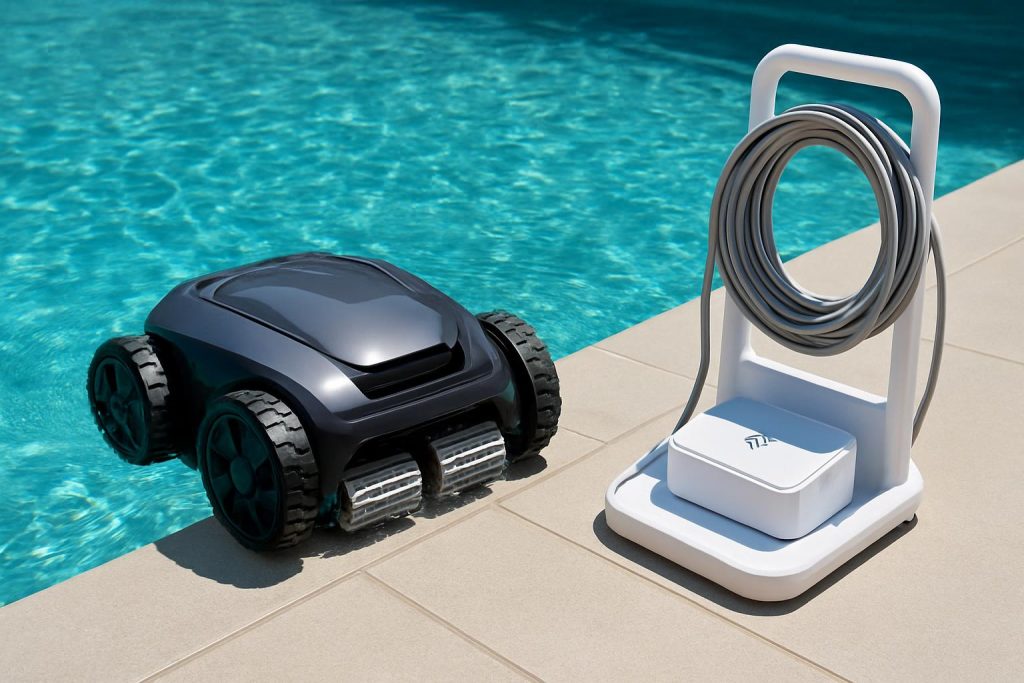
The P965iQ is a 4-wheel-drive robotic pool cleaner with Wi-Fi and iAquaLink app control. It cleans floors, walls, and the waterline. It uses a large, top-load filter canister and a strong vortex vacuum design to keep suction consistent as the bin fills. It includes a caddy for storage and transport, and a tangle-reducing swivel on the floating cable. It targets in-ground pools up to about 60 feet in length and supports several cleaning modes and schedules.
Who It Is For
It is best for busy owners who want a set-and-forget tool with top-tier cleaning. If your pool gets leaves, pollen, or fine dust, the large canister and strong suction help a lot. If you need reliable waterline scrubbing due to sunscreen films or algae, the 4WD traction and brushing are a good match. If you like remote control and scheduling from your phone, the iAquaLink app adds convenience.
Key Specs at a Glance
Four-wheel drive traction, floor plus wall plus waterline cleaning, large top-load filter canister, lift system for easy removal from the pool, Wi-Fi with iAquaLink app control, floating cable with swivel for reduced tangling, caddy included. Cleaning cycles vary by mode and can be adjusted in the app. Suitable for concrete, plaster, pebble, fiberglass, and vinyl liner pools when maintained correctly.
Setup and First Use
Unboxing and Assembly
Assembly is straightforward. Attach the control unit to the caddy, route the cable guides, and seat the cleaner on the base. The process takes about 15 to 20 minutes at a relaxed pace. The caddy is worth using because it protects the power supply, keeps the cable tidy, and makes storage simple.
Wi-Fi and App Setup
Download the iAquaLink app, create an account, and follow the pairing steps. Place the control unit where it has a steady Wi-Fi signal. Most home routers use 2.4 GHz for device pairing, so ensure that option is enabled. Keep the control box off the ground and at least several feet from pool splash zones.
Placement and Start
Uncoil the floating cable fully and lay it straight along the pool edge. Submerge the cleaner and allow it to fill with water. Gently move it to release trapped air. Power on the control unit, choose your mode, and let it run. The first cycle helps the cleaner learn your pool dynamics such as length, slope, and obstacles.
Features That Matter
4WD Traction and Waterline Cleaning
The 4WD system grips well on common surfaces and maintains traction on slopes. It climbs walls reliably and stays at the waterline long enough to scrub off films and line buildup. If you struggle with rings from oils and lotion, this is a strong point of the P965iQ.
Vortex Vacuum and Large Filter Canister
The vortex design maintains airflow even as the canister fills, which helps reduce clogs and suction drop. The top-load canister lifts out easily and opens with a simple latch for rinsing. It handles leaves, twigs, acorns, and heavy pollen. For ultra-fine dust, a fine or ultra-fine canister insert improves capture. Empty and rinse after each cycle to keep performance high.
Lift System for Easy Removal
When you trigger lift mode in the app or on the controller, the cleaner drives to a wall near you and expels water to reduce weight. This makes it easier on your back and reduces strain on the handle. It is a small detail that adds real daily convenience.
Scheduling and Remote Control
Through the app you can set daily or weekly schedules, choose modes, or start a quick clean before guests arrive. There is also a manual steering option in the app for spot cleanups. Schedules work well when your Wi-Fi signal to the control unit is stable.
Caddy and Storage
The included caddy is sturdy and balanced. It keeps the power supply upright, reduces cable kinks, and makes it simple to move the cleaner in and out of storage. This also helps extend the life of the cable and power supply by keeping them off hot decks and wet spots.
Performance Testing
Floor Coverage and Debris Pickup
Coverage is thorough on open floors, including deep ends. The cleaner handles sand, silt, leaves, and seed pods. It does multiple passes and varies angles, reducing missed strips. On larger pools, one full cycle usually delivers a clean floor. Extremely heavy leaf dumps may need a second cycle or a mid-cycle canister emptying.
Wall and Waterline Results
Climbing is consistent, and it lingers at the waterline to brush and vacuum. Algae film and sunscreen residue come off with regular use. For neglected pools, you may need a few cycles and a fine filter insert to catch suspended fines after brushing.
Steps, Benches, and Odd Shapes
Like most robots, steps and ledges are a challenge. The P965iQ will contact and brush some steps but may not perch on narrow treads. Benches and swim-outs get partial coverage. Use manual app control for quick spot passes if needed, or do a brief hand brush on complex steps.
Different Pool Surfaces
On plaster and pebble finishes, traction is strong. On fiberglass and tile, it still grips well. For vinyl liners, make sure there are no loose edges or sharp points. Inspect the tires and brush for wear and replace when smooth to avoid slipping. If you have a delicate liner, keep the cleaner free of sharp debris in the canister.
Energy Use and Noise
Robotic cleaners draw modest power compared to running a booster pump. The P965iQ is quiet. You will hear the hum of the motor block and splashes at the waterline, but it is not disruptive. Using this robot instead of a pressure-side cleaner can lower your energy use over a season.
Maintenance and Care
Filter Choices and Cleaning Frequency
Rinse the canister after every cycle with a hose. For heavy debris, empty mid-cycle to maintain suction. Use a standard canister for leaves and mixed debris. Use a fine or ultra-fine insert for dust, ash, or silt. Allow the canister to dry before storage to prevent odor and biofilm.
Cable Management and Swivel
The cable has a swivel to reduce tangles. To help it further, unroll the cable fully and lay it straight for the first few uses. After each cycle, remove the robot and pull the cable through your fingers to release any coil memory. Store the cable on the caddy without tight loops.
Routine Parts and Lifespan
Inspect tires, brushes, and bearings every few months. Replace tires when tread is worn or slippery. Replace the brush when bristles are flattened. Check the canister seal to ensure good suction. These small parts keep performance sharp and protect the motor from strain.
Off-Season Storage
Rinse the cleaner with fresh water. Dry the canister and body. Store the cleaner on the caddy in a cool, dry place out of sun. Do not leave the robot in the pool for extended periods. Keep the control unit indoors if freezing temps are expected.
App Experience
Daily Schedule and Modes
The app is simple. You can pick floor-only or floor and wall modes, and adjust run time to match debris load. Set repeating schedules for weekdays or weekends. Use manual steering for spot cleanup. Firmware updates occasionally add refinements or stability improvements.
Connectivity Tips and Limitations
Place the control unit within good Wi-Fi range. If your router is far away, add a Wi-Fi extender. Avoid placing the control box behind thick walls or metal objects. If the app shows intermittent offline messages, reboot the control unit and check the network band and password settings. Once connected, schedules run reliably.
Pros and Cons
What It Does Well
Strong suction with consistent pickup from the vortex design. Reliable wall and waterline cleaning with 4WD traction. Large, easy to clean top-load canister. Lift system that makes removal simple. App control with schedules and spot steering. Included caddy for storage and cable care. Low ongoing energy cost compared to pressure-side systems.
Where It Falls Short
High purchase price. Weight is noticeable when lifting, even with the lift system. Steps and narrow benches need occasional manual help. Wi-Fi setup can be fussy on some networks. Cable can still coil over time if not managed. Replacement parts cost more than budget models.
Common Issues and Fixes
Stuck on Drain Covers
Some raised main drains can pause the robot. If this happens often, consider a drain cover with a dome shape that is robot-friendly. You can also adjust the cleaner start position and ensure the cable lays freely to reduce repeated paths.
Climbing Too Much or Not Enough
If the cleaner spends too long at the waterline or slides back, check tire wear. Clean the tires and brush to remove oils. Make sure the canister is not overfilled. For excessive climbing, try a floor-only cycle occasionally to reset pathing.
Connectivity Drops
Reboot the control unit, confirm 2.4 GHz availability, and reduce distance to the router. Update the app and check for firmware updates. If the power supply overheats in direct sun, shade it and try again.
Error Lights
Clear any debris from the impeller and check the canister seal. Remove trapped air by tilting the unit underwater. Inspect cable connections at the control unit for a solid seat. Power cycle to reset.
Safety and Best Practices
Unplug the control unit before lifting the robot from the pool. Keep swimmers out while the robot is running. Keep the power supply at least ten feet from the water and off wet surfaces. Do not use the robot during chemical shocking or when the pool cover is on. Avoid operating in water below the manufacturer’s minimum temperature range.
Value and Alternatives
The P965iQ sits in the premium tier. You are paying for strong cleaning, app control, lift system, and a robust build. If you want similar wall and waterline performance at a lower price, look at midrange robots without Wi-Fi and without lift systems. If you want even more features, some flagship models from other brands add advanced mapping and multi-layer filters, often at a higher price.
Compared to Budget Robots
Budget units often lack waterline scrubbing, have smaller filter baskets, and no app. They can still clean floors well in small pools but need more assistance and manual scheduling. If you want minimal supervision and better waterline results, the P965iQ justifies the spend.
Compared to Pressure-Side and Suction Cleaners
Pressure-side systems need a booster pump and extra plumbing. Suction cleaners tie up your filtration system and raise filter maintenance. The P965iQ is plug-and-play and keeps debris out of your pool filter. Over time, the energy savings and lower wear on your main pump can offset part of the upfront cost.
Buying Advice and Configurations
Choosing Filter Canisters
Use the standard canister for mixed debris. If your area has fine dust or ash, add a fine or ultra-fine insert. Rinse after every cycle. Keep a spare canister insert on hand during peak pollen season so you can swap quickly between runs.
Who Should Not Buy It
If your pool is small, simple, and rarely sees debris, a basic robot may be enough. If your Wi-Fi is unreliable and you do not care about app features, you can save money with a non-connected model. If you have extremely complex steps and tight ledges, no robot will fully replace occasional hand brushing.
Practical Tips for Better Results
Brush the pool walls once a week during heavy swim season to loosen biofilm, then run the robot to capture the debris. Skim large leaves before starting a cycle to prevent early canister fill. Alternate floor-only and full wall cycles to balance cleaning time and energy. Run shorter cycles more frequently during leaf fall rather than one long marathon. Keep calcium and pH balanced to prevent scale, which reduces traction and clogs filters.
Warranty and Support
Polaris provides a limited warranty typical of premium robotic cleaners. Register your product after purchase and keep the receipt. Use authorized parts to maintain coverage. If service is needed, contact Polaris support or an authorized service center. Routine maintenance like rinsing the canister and storing on the caddy helps prevent avoidable issues.
Conclusion
The Polaris P965iQ delivers strong cleaning, reliable wall and waterline performance, and convenient app control. The lift system and large top-load canister make daily use straightforward. It is not the cheapest option, and Wi-Fi setup needs attention, but the core cleaning performance is excellent. If you want a premium robot that reduces manual work and keeps your pool guest-ready with minimal effort, the P965iQ is a smart choice. If you are on a tight budget or do not value app features, consider a simpler model, but expect to trade some performance and convenience. For most in-ground owners who want clean floors, crisp waterlines, and easy scheduling, this robot earns its place on the caddy.