
We are reader supported. When you purchase through links on our site, we may earn an affiliate commission. Also, as an Amazon affiliate, we earn from qualifying purchases.
A clean setup starts with a desk that does more than hold gear. When the desktop, frame, and undercarriage work together to route and hide cables, everyday clutter drops to near zero. The four desks below earned a spot because they make cable control simpler, faster, and more reliable than add-on fixes alone. I focused on stable frames, smart trays, useful grommets, and realistic day-to-day usability. If you want a setup that stays tidy through upgrades and layout changes, start here.
How I Picked These Desks
I looked for strong frames, stable desktops, and cable-first features. Built-in trays matter more than decorative holes. Real grommets help when they line up with monitors and speaker cables. Extra points for under-desk power strip mounts and leg channels. I also ranked desks on how quickly you can achieve a clean look with minimal add-ons. The goal is less fiddling and fewer visible wires.
What To Look For Before You Buy
Core cable features that matter
Integrated tray depth: Deep trays hold power strips and bricks without bulging. This reduces dangling bricks and keeps cables inside the desk footprint.
Usable grommets: Well-placed grommets along the rear third of the desk route monitor, audio, and lamp cables directly down. If you use dual monitors, two grommets spaced apart help.
Leg routing: Channels or clips along the legs keep sit-stand desk cables safe from pinch or tug. This protects device ports when you raise or lower the desk.
Desktop depth: A 28 to 30 inch depth makes it easier to hide cables behind monitors while keeping a clean front edge.
Build and stability
Rigid frame: A stable frame keeps tray contents quiet and reduces cable strain when typing or raising the desk.
Easy access: Flip-down or removable trays save time during swaps. If the tray is hard to reach, people stop using it and clutter returns.
4 Best Desks for Cable Management 2026 Clean Setup Picks
1. FlexiSpot E7 Pro Plus Standing Desk
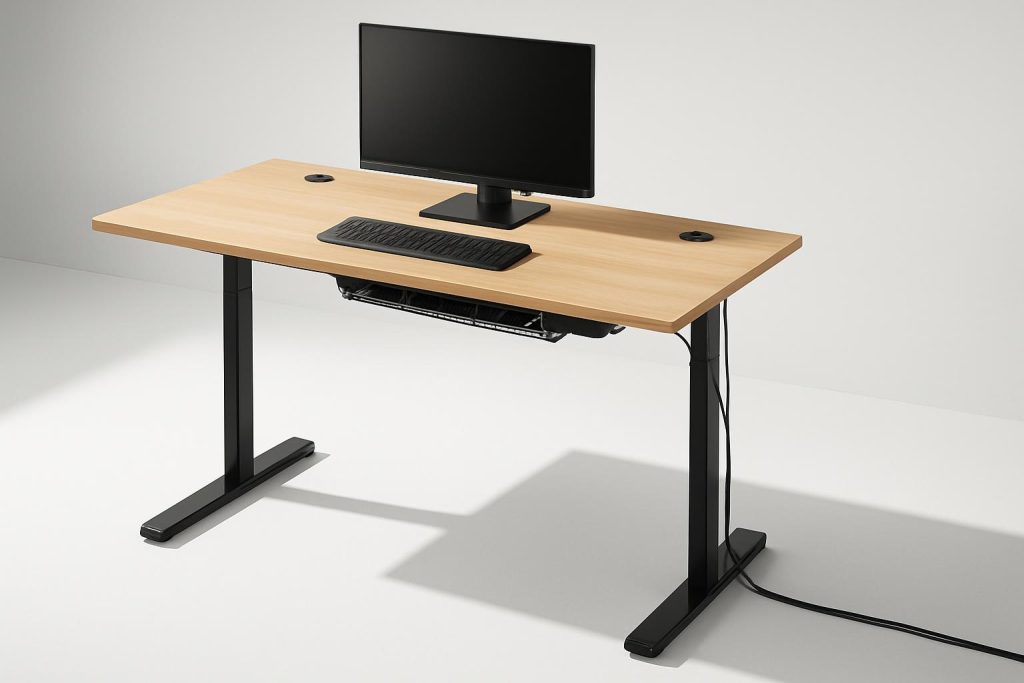
The E7 Pro Plus is a strong sit-stand desk with a heavy-duty frame and a practical under-desk management design. Its integrated tray spans the area where most people mount power strips and docks. Cord slack stays inside the tray so you can raise the desk without pulling on ports. I think this is the easiest path to a clean standing setup for mixed work and gaming.
Why it helps: The built-in tray supports power strips and adapters, while the solid frame keeps everything stable as you move. You get fewer visible loops hanging behind the monitors. Leg routing points guide the main power umbilical down one side to your wall outlet with strain relief.
Best for: Dual-monitor workstations, creators who plug in USB hubs, and anyone who wants the reliability of a proven sit-stand frame with tidy cable paths.
Potential downsides: If you run many external drives or large power bricks, space can get tight. Plan your strip layout and use short patch cables to keep the tray neat.
Key setup tips: Mount the power strip near the center of the tray to balance cable runs. Leave a gentle service loop for the main power cable where it leaves the tray, then secure it along the leg. Keep at least one spare outlet inside the tray for future accessories.
My take: I think the E7 Pro Plus gives beginners a fast win. The tray and leg routing cover the basics out of the box, and the frame stiffness avoids cable tug surprises during height changes.
2. Eureka Ergonomic Captain X Series Desk
Eureka’s Captain X series targets cable control with a rear management zone that swallows strips and adapters. The back edge is designed to hide routing, so you see a clean desktop from normal seating height. Many models also include a bracket for power strips and dedicated pass-throughs for monitor and accessory lines.
Why it helps: A raised rear channel lets you drop cables straight down from monitors into a hidden area before they enter the under-desk tray. This two-stage path stops tangles and keeps clamps for mic arms and monitor arms clear of cables.
Best for: Streamers, gamers, and anyone who wants strong built-in routing on a fixed-height desk without extra accessories.
Potential downsides: The integrated management hardware sets your cable path. If you prefer custom placement for a niche layout, you will need to adapt to its fixed zones.
Key setup tips: Center the power strip inside the rear channel or bracket and run display cables first. Add short USB-C or HDMI patch leads at the desk, then longer extensions inside the tray for clean swaps later.
My take: I think the Captain X offers the most complete out-of-the-box cable control for a non-standing desk. The rear channel reduces visual clutter fast and keeps the desk edge free of snags.
3. Arozzi Arena Ultrawide Gaming Desk
The Arena is a classic for cable management thanks to its three grommets and under-desk mesh net. The full-surface mouse pad lifts for routing, then lays flat to hide everything. The net is wide, forgiving, and easy to access. For large displays or ultrawide monitors, the grommet spacing makes clean runs simple.
Why it helps: Three top cutouts drop cables straight into a central mesh that can hold power strips, hubs, and bricks. The net design encourages tidy bundles and keeps gear elevated for airflow.
Best for: Ultrawide monitor users, dual-PC streamers, and anyone who wants a big surface with straightforward routing.
Potential downsides: The mesh can sag if overloaded. Use lightweight Velcro wraps and distribute weight across the net. If you mount heavy bricks, add a small support plate inside the net for even load.
Key setup tips: Plan left, center, and right grommet roles. For example, left for audio interface and speakers, center for display and webcam, right for keyboard and mouse cables. Zip the runs in the net at three anchor points to prevent drift.
My take: I think the Arena is the most forgiving desk for first-time cable routing. The mesh net makes trial and error painless. You can rebuild your path in minutes without drilling or special tools.
4. FEZIBO Electric Standing Desk with Drawer and Cable Management Tray
Fezibo’s popular sit-stand models ship with a simple under-desk tray and hooks for headphones or bags. The tray holds a power strip and keeps cables aligned with the leg. The shallow drawer stores dongles and spare cables, which reduces desktop clutter that often leads to messy runs.
Why it helps: The included tray is straightforward and sized for common strips. With a controlled leg run, you avoid cable pull when raising the desk. The drawer keeps adapters and charging cables off the surface and out of sight.
Best for: Apartment or bedroom setups where storage, cable control, and quiet operation all matter.
Potential downsides: The tray is smaller than premium options. If you have large power bricks, use compact right-angle plugs or a low-profile strip to fit everything.
Key setup tips: Mount the strip to the rear of the tray to leave space up front for bricks. Keep the main power cable on the side with the shortest path to the wall. Label the strip outlets for quick swaps.
My take: I think this desk delivers strong value. The basic tray and drawer solve two problems at once. Pair it with a short extension lead and you get a very clean look with minimal effort.
Quick Setup Blueprint for a Clean Desk
Plan the power path first
Mount one main power strip under the desk near the center of your tray. Keep it away from the front edge to maintain knee space. Run a single main cable down the leg nearest the wall outlet. Add a soft service loop near the tray exit to prevent tugging.
Group and shorten at the desk side
Use short patch cables from devices to the tray. Keep long extensions inside the tray or along the leg. This keeps the surface clean and makes future upgrades faster.
Protect moving cables on sit-stand desks
Add slack for the tallest height you use, not only your current position. Route high-draw cables along the frame and leg, never as a hanging loop. Secure the final drop to the wall or baseboard for strain relief.
Hide, label, and ventilate
Label both ends of each cable. Leave space around power bricks inside trays or nets so heat can escape. Never daisy-chain power strips. If you add a surge protector, mount it firmly and check clearances before raising the desk.
Who Should Pick Which Desk
If you want the best all-in-one routing on a fixed-height desk: Eureka Ergonomic Captain X. The rear channel and bracket approach reduces visible clutter right away.
If you want a premium sit-stand with integrated routing: FlexiSpot E7 Pro Plus. Stable, strong, and simple to keep tidy.
If you want an easy, forgiving system for lots of gear: Arozzi Arena. The grommet and net combo handles complex builds without stress.
If you want value with storage on a sit-stand: Fezibo Electric Standing Desk with drawer and tray. Fewer parts, quick wins.
Extra Accessories That Still Help
Adhesive raceways: Run along the rear of the desktop to hide webcam and light cables before they drop into trays.
Velcro wraps: Reusable ties prevent over-tight pinches and make swaps easier than zip ties.
Right-angle power connectors: Reduce depth inside trays and help large bricks sit flat.
Short USB-C and HDMI patch leads: Keep the visible desktop side clean while the long part stays hidden in trays.
Maintenance Routine That Keeps It Clean
Every two months: Vacuum the tray or net, check for loose ties, and confirm the service loop still has slack.
When adding gear: Replace one long device cable with a short patch at the desk and route the extension inside the tray. Update labels right away.
After height changes: Raise to maximum height and look for any stretched lines. Add slack or reroute along the leg if needed.
Conclusion
A clean setup is easier when the desk does half the work. The FlexiSpot E7 Pro Plus and Fezibo sit-stand models keep movement safe and tidy. The Eureka Ergonomic Captain X hides routes at the source with a rear channel. The Arozzi Arena makes complex layouts manageable with a forgiving net. Pick the one that fits your space and style, plan your power path, and keep cables grouped and labeled. Once the tray holds your bricks and the leg handles your main drop, the rest becomes simple routine care.
FAQ
Q: Which desk in this list has the most complete built-in cable management out of the box?
A: Eureka Ergonomic Captain X offers the most complete out-of-the-box cable control for a fixed-height desk thanks to its rear channel and bracket approach.
Q: Do I still need cable ties or raceways if my desk has a tray?
A: Yes, short Velcro ties and simple adhesive raceways keep routes tidy and make future swaps easier even when a tray is included.
Q: What desk depth works best for hiding cables?
A: A 28 to 30 inch desktop depth gives enough room to hide cables behind monitors and still keep a clean front edge.
Q: How do I prevent cable tug on a standing desk?
A: Leave a soft service loop near the tray exit, route the main power down one leg, and set slack for the tallest height you use.
Q: Is it safe to mount a power strip under the desk?
A: Yes, as long as you mount it firmly, avoid daisy-chaining strips, leave ventilation for bricks, and verify clearance at full height.