
We are reader supported. When you purchase through links on our site, we may earn an affiliate commission. Also, as an Amazon affiliate, we earn from qualifying purchases.
Choosing a Wi‑Fi enabled cooktop in 2026 no longer feels experimental. The best models combine fast heating, strong safety controls, and apps that actually help. This guide shows how to pick between induction and gas, which smart features matter, how to install and care for your cooktop, and how to avoid common pitfalls so daily cooking stays simple.
What changed in 2026
Smart cooktops matured. Setup is faster through QR or NFC pairing. Apps are cleaner, with fewer steps to reach a timer, lock, or preset. Induction units deliver stronger boost power and steadier low heat. Gas models add better flame sensing and auto relight logic. Most brands support scheduled firmware updates so you control when changes happen. Compatibility with major voice assistants is stable, and core functions work offline when your internet goes down.
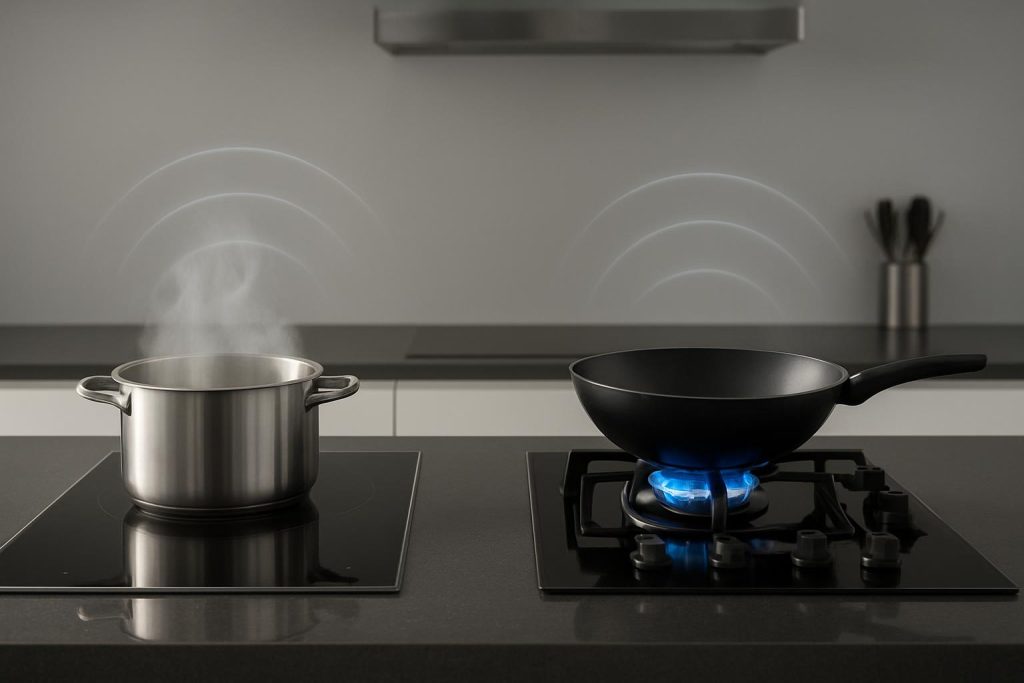
Induction vs gas for smart kitchens
Smart induction at a glance
Induction uses magnetic fields to heat the pan directly. It is fast to boil, precise at low heat, and efficient. Surfaces stay cooler than gas, which lowers the risk of burns and sticky baked-on mess. Wi‑Fi features often include remote status, alerts, lock control, zone timers, bridge control for griddles, and guided recipes. Many also track energy use per session.
Smart gas at a glance
Gas offers visible flame and familiar response. Wi‑Fi adds flame monitoring, burner-on notifications, and safety routines that can cut gas flow or remind you to shut off. Some models provide simmer control that holds a steady low flame and alert you if a gust or boilover snuffs it. Expect app timers and lock features, plus integration with a smart range hood for auto venting.
Which one fits your cooking style
Choose induction if you want the fastest heat, very low simmer control, easy cleanup, and strong safety. Choose gas if you prefer flame for charring, high-heat wok work using a round-bottom wok and wok ring, or if your pans are not induction compatible. If you own a mix of cookware and you love precise sauces, induction is hard to beat. If you cook over flame for taste and technique, modern gas with Wi‑Fi safeguards can still suit you well.
Energy and ventilation factors
Induction is efficient and adds less heat to the room. A good vent is still recommended. Gas produces combustion byproducts and moisture. Use a strong vent hood vented outside whenever possible. If you cannot vent outside, select a recirculating system rated for your cooktop size and keep filters clean.
Core Wi‑Fi features that matter
Setup and connectivity
Look for onboarding that uses a QR or NFC tap, 2.4 and 5 GHz Wi‑Fi support, and the option to add the cooktop to your existing smart home platform. A recovery path for network changes prevents redoing the entire setup after a new router.
Safety and monitoring
Key functions include remote status, burner-on and overheat alerts, child lock, pan detection on induction, flame monitoring on gas, auto shutoff timers, and residual heat indicators. Geofenced auto shutoff can help, but manual confirmation on-device is still important.
Cooking assistance and automation
Useful tools include zone timers, temperature or power steps, bridge control, recipe guidance, and auto vent activation with a compatible hood. Avoid systems that lock basic features behind a subscription.
Energy and usage insights
Energy tracking shows time on heat levels or estimated kWh for induction. This helps you compare habits and spot wasted power. Reports should be easy to export and readable without logging into a desktop portal.
Privacy and offline resilience
Pick brands that state what they collect, allow opt out of analytics, and keep core functions local. The best systems keep cooking controls, timers, and lock working without internet. When offline, the app should show a clear status and resume syncing once connected.
Best picks by need in 2026
Best overall smart induction cooktop
Look for a 30 or 36 inch glass surface with four or five zones, at least one large 11 inch zone or a flexible bridge for griddles, strong boost power, and steady low simmer. The app should provide remote status, lock, zone timers, energy insights, and simple guided cooking you can skip when you just want manual control. Expect scheduled firmware updates and offline operation of core controls.
Best budget smart induction cooktop
Target a 30 inch unit with four zones, reliable pan detection, essential app alerts, and a basic bridge function. Skip hand-holding features you will not use. Favor brands that publish cutout dimensions clearly, include a sturdy mounting kit, and provide fast customer support for connectivity questions.
Best for large families or frequent meal prep
A 36 inch induction with five zones and two bridgeable pairs works well. You gain space to run a stockpot, a wide skillet, and a griddle at once. Seek app support for multiple timers labeled by zone and persistent alerts that do not disappear if your phone locks. A hood pairing that ramps up automatically during boost helps control steam.
Best smart gas cooktop for high-heat searing and wok work
Look for a 36 inch layout with a high output center burner and solid continuous grates. Wi‑Fi should add flame-out detection with auto relight, burner-on alerts, lock control, and remote status. Pair with a hood that supports auto start when a burner is detected. A low simmer burner keeps sauces stable while the center handles searing.
Best choice for small kitchens and renters
If you cannot alter counters, consider a compact 24 to 30 inch induction with Wi‑Fi and a standard plug where allowed by code, or a portable induction hob with app support if your lease restricts installations. Favor units with clear ventilation guidance and strong surface protection to avoid scratching rental counters.
Best hybrid approach
If you love gas sear but want induction control for sauces, combine a two-burner gas module with a two-zone induction module if your counter allows. This keeps flame for specific dishes and adds fast, safe induction for daily cooking. Use a hood sized for the total width and power.
Installation checklist
Electrical needs
Most induction cooktops require a dedicated 240 volt circuit sized to the unit rating. Confirm amperage in the manual and use a licensed electrician if you are not trained. Keep the junction box accessible. Never oversize a breaker to make a unit work.
Gas and ventilation
For gas, hire a licensed professional to connect and leak test. Follow local codes for shutoff valve placement and flex connector type. A vent hood that is at least as wide as the cooktop improves capture. Maintain clearances from cabinets per the manual.
Countertop cutout and clearance
Measure twice before cutting. Respect required clearances to walls, drawers, and oven cavities below. Induction units need airflow under the glass. Do not pack drawers tight against the housing. Seal the counter per the manual to prevent spills wicking into cabinetry.
Network placement
Place your router or a mesh node close enough for stable signal. 2.4 GHz travels farther through walls, but 5 GHz can be faster. Avoid placing a metal hood or duct right between the cooktop and the access point. Name your networks clearly so you do not join the wrong band during setup.
Daily use tips that save time
Preheat and power management
Induction heats pans so quickly that long preheats are wasteful. Start at a medium setting, add oil, then adjust. For gas, size the flame to the pan base to keep heat under control. Use app timers tied to zones so each task gets its own reminder.
App routines that work
Build simple routines. A morning routine can lock controls and turn on the hood for two minutes to clear overnight odors. An evening routine can check status, send a reminder if any zone was left on, and switch the hood light to low. Keep routines short to reduce false triggers.
Pan compatibility test
For induction, test pans with a magnet. If it sticks well to the base, it will heat. You need pans with a magnetic base such as cast iron or magnetic stainless; aluminum without a steel plate will not heat on induction. Use flat, warp-free bottoms for best contact.
Avoiding false alarms
Set reasonable alert thresholds in the app. Label zones so notifications make sense at a glance. Disable geofenced shutoff if multiple family members cook at different times and not everyone uses the app.
Cleaning and care
Induction glass routine
For induction, wipe daily with a soft cloth and a nonabrasive cleaner. Lift spills with a plastic scraper while the surface is warm, not hot, then polish dry. Do not use abrasives or harsh pads that haze the glass.
Gas grate and burner maintenance
For gas, soak grates in hot soapy water, use a nylon brush on tough spots, and dry fully to prevent rust. Clear burner ports gently with a soft brush, never a toothpick or pin that could widen holes. Reassemble carefully so caps sit flat. Run the vent to clear odors after cleaning.
Wi‑Fi module care and updates
Dust the control area lightly and keep liquids away from vents or seams. In the app, enable scheduled updates at a low-traffic time. Read release notes so you know what changed. If an update fails, power cycle per the manual rather than unplugging randomly.
Troubleshooting common issues
App cannot find the cooktop
Confirm the phone is on the same network band the cooktop supports. Move closer to the unit and power cycle it. If you changed the router or password, use the cooktop network reset procedure and scan the QR code to rejoin.
Burner offline or error codes
For induction, remove the pan and check for residue or a warped base. Clean the glass and try again. For gas, verify caps are centered and ports are clear. If errors persist, take a photo of the code in the app and contact support with the model and firmware version.
Connectivity drops during cooking
Cooking continues locally even when the app disconnects. Place a mesh node closer, reduce interference from metal ducts, and ensure your phone does not switch to a different network mid session. Keep the firmware and the app updated.
How to compare models quickly
Match size to your cutout and vent first. Pick induction for speed, control, and easier cleanup, or gas for flame techniques. Confirm that the app delivers remote status, alerts, lock, timers, and offline resilience. Favor models with scheduled updates and transparent privacy. Check that support materials and wiring diagrams are clear. Finally, confirm your cookware is compatible if you choose induction.
Conclusion
Smart cooktops in 2026 focus on reliability, safety, and everyday time savings. Induction leads for speed, precision, and easy cleanup. Gas remains strong for flame-driven techniques, now with better monitoring. Choose the format that fits your cooking and your home, verify installation and ventilation, and use smart features that reduce steps rather than add them. With the right setup, you get faster meals, fewer messes, and a kitchen that works with you.
FAQ
Q: What Wi‑Fi features matter most on a cooktop in 2026
A: The most useful features are remote status and alerts, lock and safety automation, reliable offline controls, precise temperature or power steps, guided cooking only if it works without a subscription, over the air updates you can schedule, and simple onboarding with QR or NFC.
Q: Which is safer for families, induction or gas with Wi‑Fi
A: Induction is safer for families because the surface stays cooler, there is no open flame, and many models add pan detection, auto shutoff, and child lock.
Q: Do I need special pans for induction
A: You need pans with a magnetic base such as cast iron or magnetic stainless; aluminum without a steel plate will not heat on induction.
Q: Can a smart cooktop work without internet
A: Yes, basic cooking always works without internet; you lose remote notifications, voice control, and cloud recipes until the connection returns.
Q: How should I clean a Wi‑Fi enabled cooktop
A: For induction, wipe daily with a soft cloth and a nonabrasive cleaner, lift spills with a plastic scraper while the surface is warm, and polish dry; for gas, soak grates in hot soapy water, clear ports with a soft brush, dry fully before reassembly, and run the vent to clear odors.